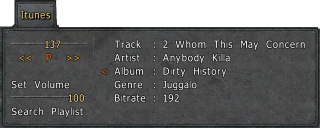
Here is the problem... I've created my own simple jukebox. (which I will attach) It contains two menus. The main one that allows you to start from the beginning of the playlist, click on the song you want to play from, or call up the second menu. The second menu allows you to choose which directories are included in the playlist. The problem is, as the playlist gets longer the font size is automatically scaled down to show the whole list. I've tried placing guiautotab in various places (first comand in the newgui body, first in the guilist body, etc.) Eventually, I just created my own autotab function.
I've included both scripts in the zip file.
How it works... First off, I created a folder named "Music" in the "packages" folder. I then added all the music folders I might want to listen to. (Including a copy of "fanatic" so I can rename the files with the title.) Then, in each of these folders I place a file named "titles.cfg"
which contains the line 'songnames = "..." '. This allows you to choose which songs and in what order they are played. (I found a neat script in this forum that redid the playsong command that used "loopfiles" to automatically adjust the randomizer to any files added to "fanatic". But it would place them in alphabetical order only) Next, you add to your autoexec...
songdir = "..." // all the folders in Music
exec myjuke.cfg
this will bind the 'j' key to the new menus and define 'myjuke'
The first time you call up the menu it will send you to the second menu. Simply click on all the directories you want added to the playlist. then click 'done'
The main menu is self explanatory.
This does not stop the 'playasong' from executing with every load. Simply enter the console comand 'myjuke' and it will play the current song on the playlist.
Any help, comments, advice will be appreciated.
But, it may take me some time to get back to you.
Thanks in advanced
I've gone through tons of content now, including several discussions and I'm sorry if someone already mentioned this here and I'm redundantly bringing it up again, but on the other hand, there's no way I could know, because of the following things that I think Quadropolis is missing out on and which me and many others would like to see in the future, if that's possible.
- Search engine
This is a huge sauerbraten database which you all can be proud of. I haven't checked by whom this page is powered, nor if it's possible for you to just include one or if you'd have to program it... fact is, that this is a must for a huge, vast and rich library like this one. It would sure enhance browsing around, having fun and experimenting.
- Profile details/tracking
Don't get me wrong, I don't want to write my hobbies and religious views on my profile or anything, what I mean is this:
Would be nice if one could see all the posts and content which was created by a specific user. I'm interested in you guys, and I'm sure, so are a lot of other people, so why not let them see what you've made? Would be cool if one could see a chart showing all the created content by a specific person sorted by kind (maps, scripts, mods etc.).
I don't want to sound all dramatic, and if you have a good reason for not doing this, I'm all right with it and I still like this site.
Just want to point out that I'm not the only one thinking that there are still some things to be improved.
Have a nice day
iCrab
Well, to be honest, I hate what they did with the menus in Justice edition. You can only see like 3 buttons in the multiplayer menu if you are not on a server, and when you do get on a server, you can't bring up the normal esc menu unless you type /showgui main.
Is there any way to change this back to be like trooper edition?

I had the idea for a map where you spawn in helicopters. I made it work by setting the mapmodel's 3rd argument to 2, and then putting clip around the model. However, when I restarted the map, the mapmodel acted like it was solid until I clicked on it. Is there any way I can fix this?
I recently just started using Autodesk 3ds, and I am trying to create a set of new hudguns. I am also going to replace the sound files to make them more realistic.
Pistol: Desert Eagle
Rifle: Unsure
Chaingun: Assualt Rifle with undermount luancher; possibly ACR or similar
Grenades: Assualt Rifle Grenade undermount
Fist: unsure
Rockets: RPG (unsure with the visible rocket; It might look weird firing)
Shotgun: Unsure; possibly just a simple combat shotty
If anyone has any suggestions on the weapons, I am open to ideas. (If I feel they are worth something, I will post the finished products to Quad). I have just finished the design and texturing of a pistol replacement, which will be a Desert Eagle. Now to the part where I am stuck. First of all, does the size of the model on the program matter? Next, what would I essentially have to do to add in animation? Finally, how would I tie this into sauerbraten? Thanks for any help!
Some one plz help me I can't figure out how to get script from quadroapolis to sauerbraten
O ya I'm on a Mac if that helps
When i had vista Sauer worked perfectly. I could run Sauer on just about its full settings. now that ive upgraded to windows 7 sauerbaten runs SOOOOOOOOOOOOO slow on even the lowest setting. so bad that the startup menu is hard to navigate. I would jut like to know if there is somthing im missing o_O why isnt sauer running like it used too?
More details about my computer
Component Details Subscore Base score
Processor Intel(R) Core(TM)2 Duo CPU T6400 @ 2.00GHz 5.5 3.4
Determined by lowest subscore
Memory (RAM) 4.00 GB 5.5
Graphics NVIDIA GeForce 9300M GS (Microsoft Corporation - WDDM v1.1) 3.4
Gaming graphics 1791 MB Total available graphics memory 5.2
Primary hard disk 138GB Free (221GB Total) 5.6
Windows 7 Professional
System
--------------------------------------------------------------------------------
Manufacturer ASUSTeK Computer Inc.
Model N80Vb
Total amount of system memory 4.00 GB RAM
System type 32-bit operating system
Number of processor cores 2
64-bit capable Yes
Storage
--------------------------------------------------------------------------------
Total size of hard disk(s) 221 GB
Disk partition (C:) 138 GB Free (221 GB Total)
Media drive (D:) CD/DVD
Graphics
--------------------------------------------------------------------------------
Display adapter type NVIDIA GeForce 9300M GS (Microsoft Corporation - WDDM v1.1)
Total available graphics memory 1791 MB
Dedicated graphics memory 512 MB
Dedicated system memory 0 MB
Shared system memory 1279 MB
Display adapter driver version 8.15.11.8593
Primary monitor resolution 1280x800
DirectX version DirectX 10
Network
--------------------------------------------------------------------------------
Network Adapter Realtek RTL8168C(P)/8111C(P) Family PCI-E Gigabit Ethernet NIC (NDIS 6.20)
Network Adapter Intel(R) WiFi Link 5100 AGN
Notes
--------------------------------------------------------------------------------
The gaming graphics score is based on the primary graphics adapter. If this system has linked or multiple graphics adapters, some software applications may see additional performance benefits.